Update acceptance tests (Part 2)
At the end of the last chapter, we extracted a function called renameModule. It received an input file (a file that may or may not be a valid acceptance test) and returned it unchanged.
function renameModule(file: string): string {
  return file;
}In this chapter, we'll instruct this function to update the file (if it is valid) by renaming the test module. We'll use @codemod-utils/ast-javascript to parse and transform the file.
Goals:
- Use AST explorer as a playground
- Use
@codemod-utils/ast-javascriptto read and update files - Make early exits
- Auto-fix fixtures
Hello, AST!
Libraries like recast and @glimmer/syntax help us convert JS/TS and HBS files to an AST (abstract syntax tree). codemod-utils wraps these libraries to provide you an interface that is standardized:
AST.traverse(traverse the tree)AST.builders(build a new tree)AST.print(convert the tree to a file)
import { AST } from '@codemod-utils/ast-javascript';

function transform(file: string): string {
  const ast = AST.traverse(file, {
    /* Use AST.builders to transform the tree */
  });

  return AST.print(ast);
}import { AST } from '@codemod-utils/ast-template';
function transform(file: string): string {
const ast = AST.traverse(file, {
/* Use AST.builders to transform the tree */
});
return AST.print(ast);
}Based on the how-to's above, try using AST in renameModule so that it remains an identity function. That is, define traverse (on line 10) so that the input file and the returned file have the same value.
We pass another argument called data to renameModule. It is an object that contains any additional information that we need to read and update the file.
Solution
import { readFileSync, writeFileSync } from 'node:fs';
import { join } from 'node:path';

+ import { AST } from '@codemod-utils/ast-javascript';
import { findFiles } from '@codemod-utils/files';

import type { Options } from '../types/index.js';

function renameModule(file: string): string {
+   const ast = AST.traverse(file, {
+     // ...
+   });
+
-   return file;
+   return AST.print(ast);
}

export function renameAcceptanceTests(options: Options): void {
  const { projectRoot } = options;

  const filePaths = findFiles('tests/acceptance/**/*-test.{js,ts}', {
    projectRoot,
  });

  filePaths.forEach((filePath) => {
    const oldPath = join(projectRoot, filePath);
    const oldFile = readFileSync(oldPath, 'utf8');

    const newFile = renameModule(oldFile);

    writeFileSync(oldPath, newFile, 'utf8');
  });
}Since renameModule is an identity, the test script should continue to pass.
AST Explorer
Next, we want to specify how to update the tree (how to rename the test module).
const ast = AST.traverse(file, {
  // ...
});Currently, recast and @glimmer/syntax lack documentation and tutorials. This is unfortunate, given the large amount of builders and visit methods that they provide to help you transform code.
We will use AST Explorer to test a small piece of code and familiarize with the API. The error messages from TypeScript, which you can find in your browser's console, can sometimes help.
Setup
Select the following options to create a 4-tab window:
- Language:
JavaScript - Parser:
recast - Transform:
recast
Then, copy-paste the following code:
import { module, test } from 'qunit';

module('Acceptance | forms', function (hooks) {
  test('Accessibility audit', async function (assert) {});

  module('subscribe-to-ember-times, control', function (nestedHooks) {
    test('A user can visit the form route', async function (assert) {});
  });

  module('subscribe-to-ember-times, v1', function (nestedHooks) {
    test('A user can visit the form route', async function (assert) {});
  });
});export default function transformer(code, { recast, parsers }) {
const ast = recast.parse(code, { parser: parsers.typescript });
const b = recast.types.builders;
console.log(ast.program.body);
recast.visit(ast, {
// ...
});
return recast.print(ast).code;
}TIP
The input file can be any simple code that covers a base or edge case. It should ignore things that are unimportant for the step.
Visit methods
From the console, we see that ast.program.body (the input file) is an array with 2 elements (called nodes, in the context of a tree). The nodes correspond to the import statement on line 1 and the module function on line 3.
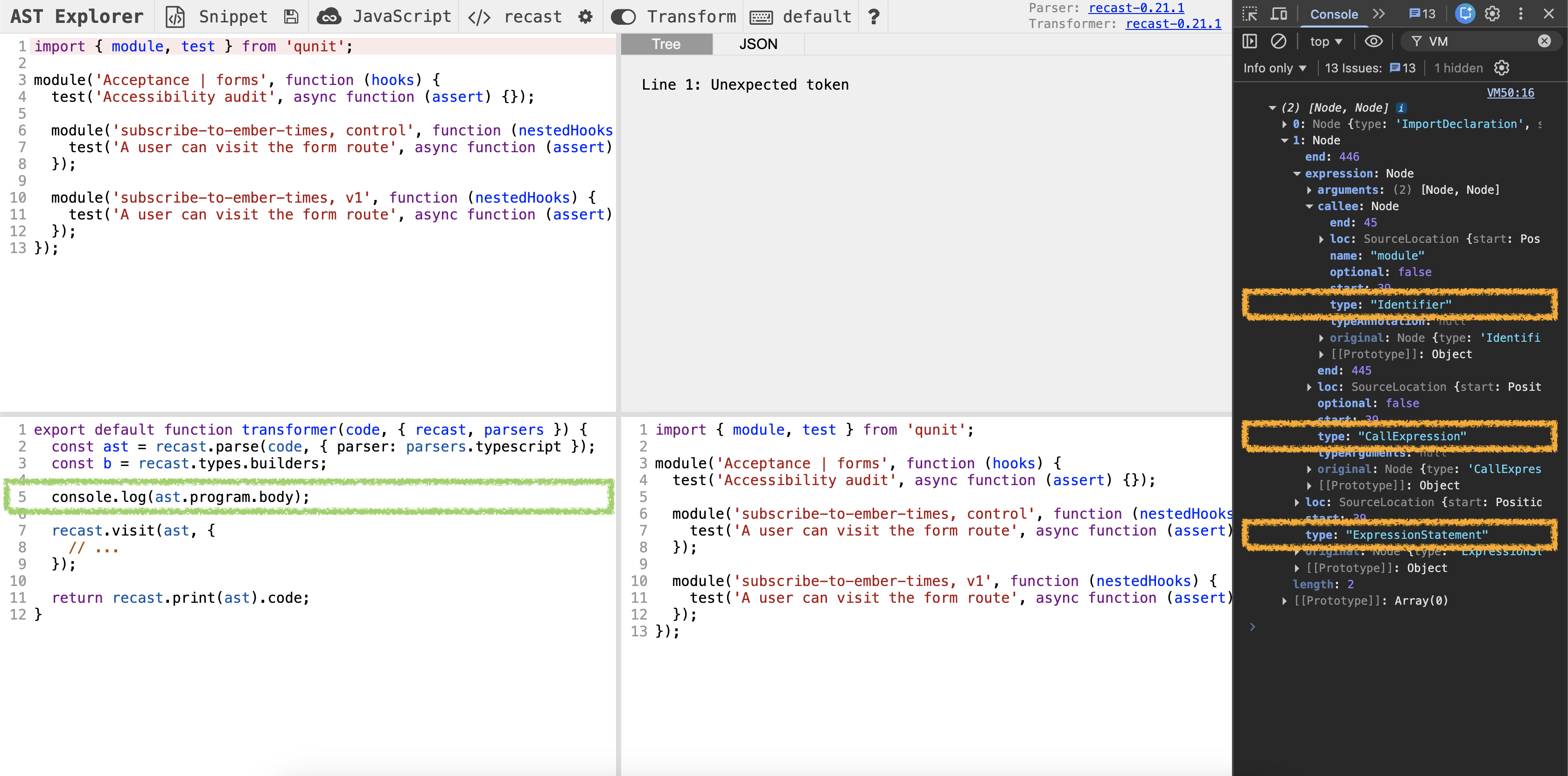
Since we are interested in updating module, we expand the 2nd element to find things that can help us. We see that there are 3 node type's associated with module:
ExpressionStatementCallExpressionIdentifier
It's a game of Goldilocks: We have to pick one that provides us enough information to rename the test module, but not too much that reading and updating the information becomes difficult. The one that's just right is CallExpression. From the type's name, we can guess the visit method's name to be visitCallExpression.
recast.visit(ast, {
  visitCallExpression(path) {
    // ...
  },
});To understand what visitCallExpression does, use console.log to check the value of path.node. The error message in the console tells us what visitCallExpression should return.
Solution
export default function transformer(code, { recast, parsers }) {
  const ast = recast.parse(code, { parser: parsers.typescript });
  const b = recast.types.builders;

  recast.visit(ast, {
-     // ...
+     visitCallExpression(path) {
+       console.log('-- CallExpression --');
+       console.log(path.node);
+
+       return false;
+     },
  });

  return recast.print(ast).code;
}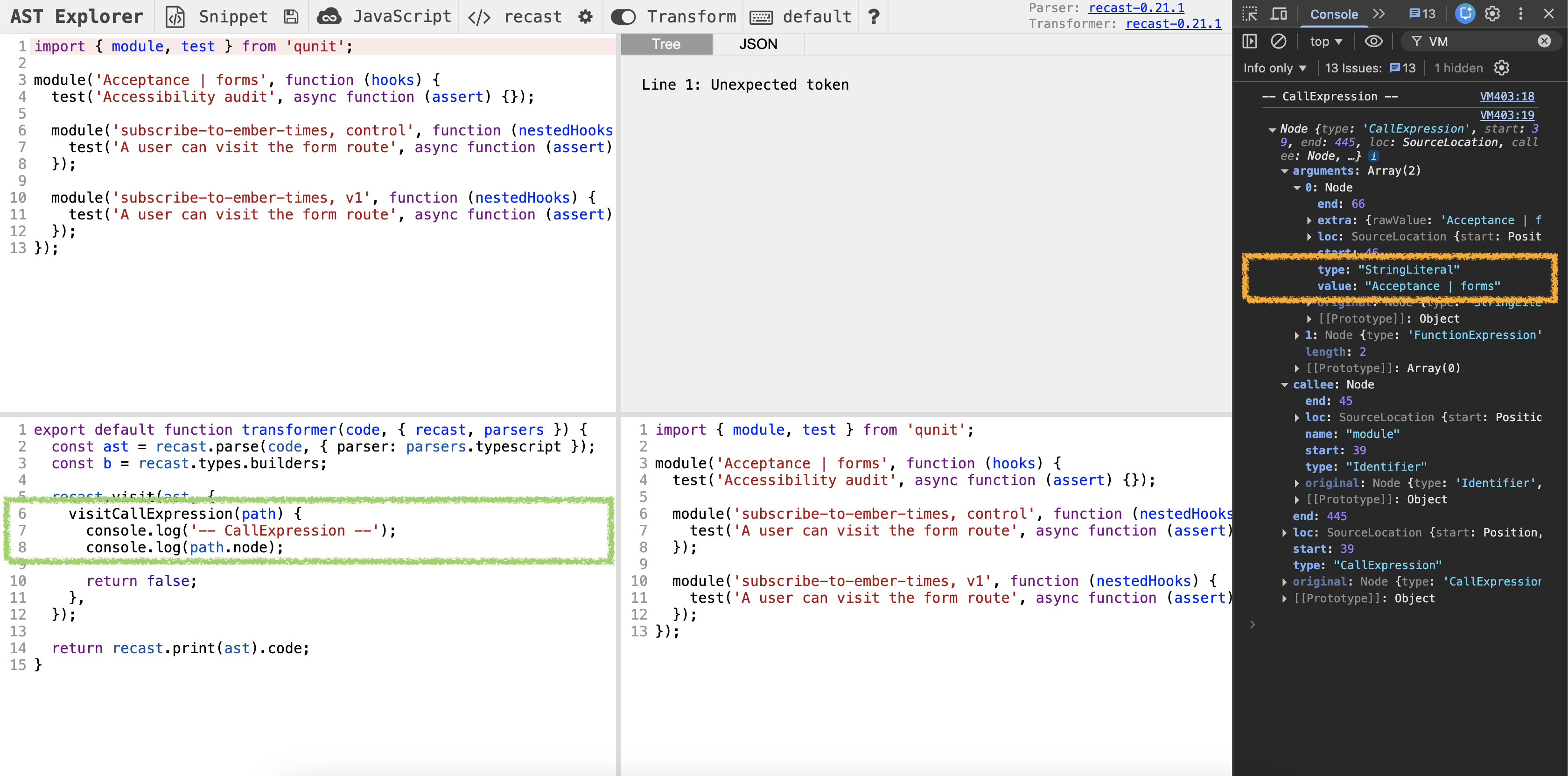
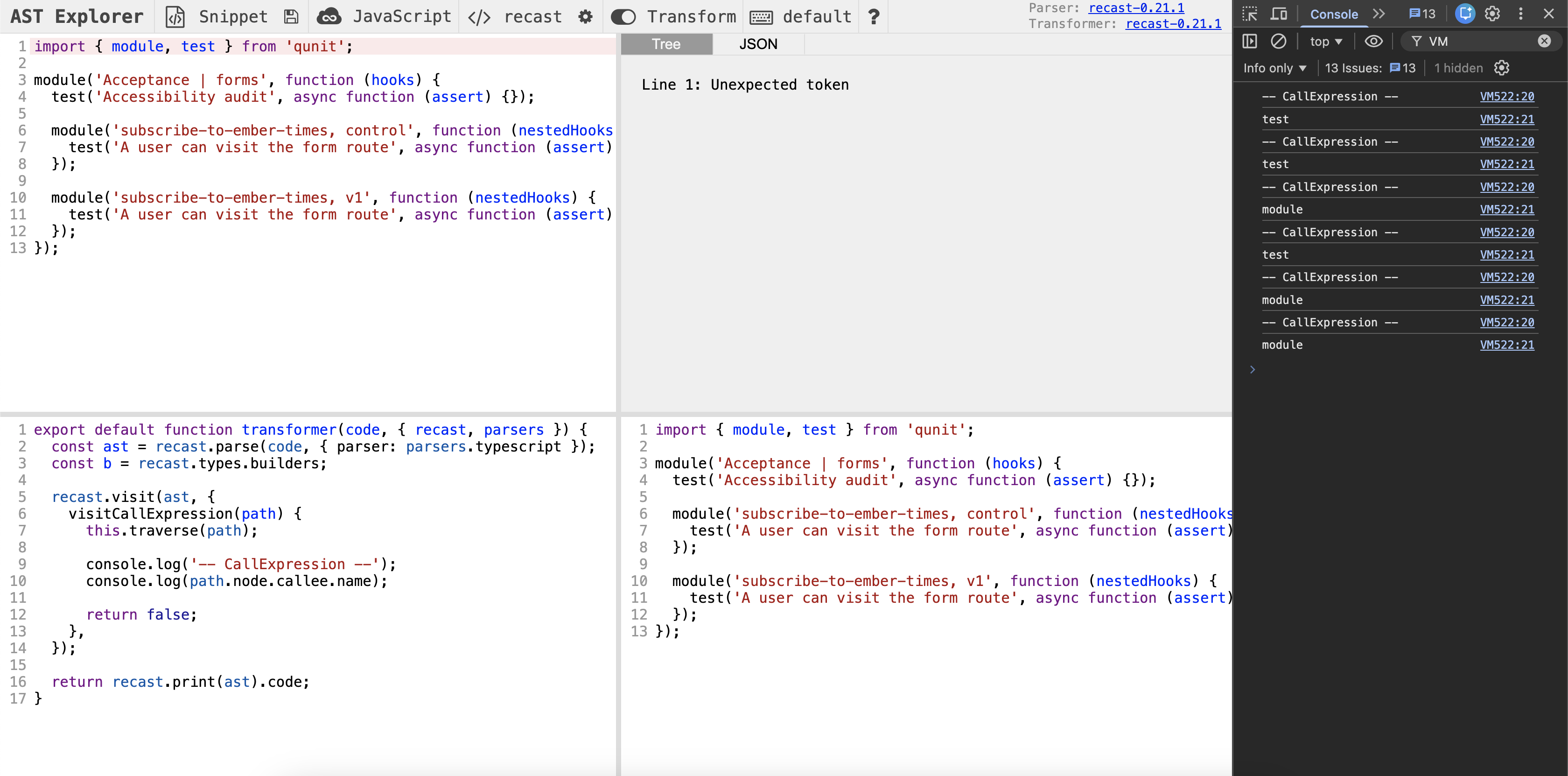
From the console's log, we see that visitCallExpression visited only 1 node. This is surprising, because the test and module functions, located inside the parent module, are also of the type CallExpression. This works in our favor, but may be a bug in some other case. To visit all CallExpression nodes, you can write this.traverse(path) to make a recursion.
Example
recast.visit(ast, {
  visitCallExpression(path) {
    this.traverse(path);

    // ...

    return false;
  },
});
Make early exits
Early exits are key to traversing path's. Without them, TypeScript will likely throw an error when you access a nested property of path (because you made too many assumptions).
Recall the console's logs from earlier:
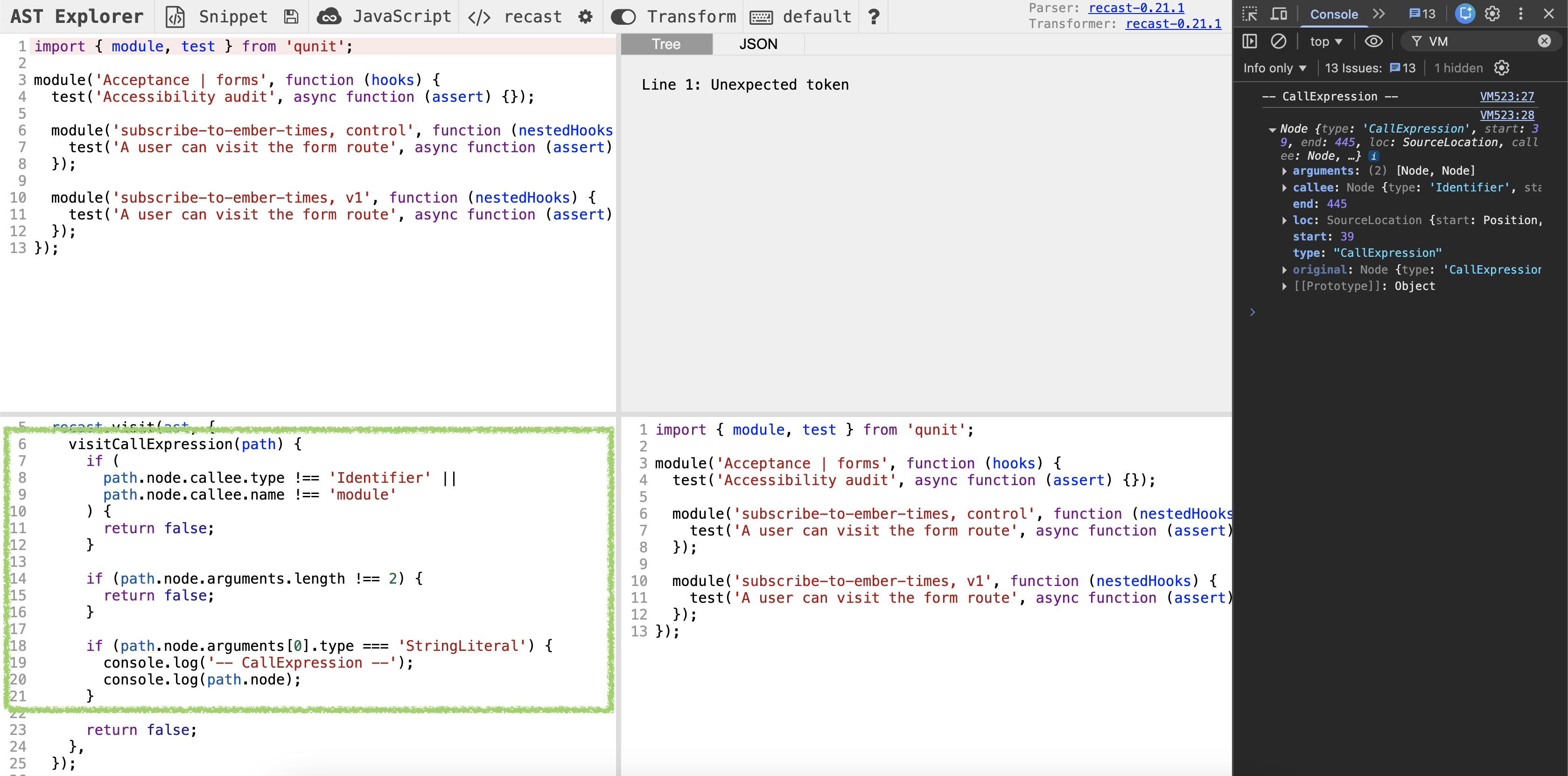
Use what are highlighted in orange (path.node.callee and path.node.arguments) to make early exits. If done correctly, you will continue to see the node for the parent module in the console. As soon as module is renamed or has incorrect arguments, the node will disappear from the console.
Solution
export default function transformer(code, { recast, parsers }) {
  const ast = recast.parse(code, { parser: parsers.typescript });
  const b = recast.types.builders;

  recast.visit(ast, {
    visitCallExpression(path) {
+       if (
+         path.node.callee.type !== 'Identifier' ||
+         path.node.callee.name !== 'module'
+       ) {
+         return false;
+       }
+
+       if (path.node.arguments.length !== 2) {
+         return false;
+       }
+
-       console.log('-- CallExpression --');
-       console.log(path.node);
+       if (path.node.arguments[0].type === 'StringLiteral') {
+         console.log('-- CallExpression --');
+         console.log(path.node);
+       }

      return false;
    },
  });

  return recast.print(ast).code;
}
NOTE
Thanks to early exits, files that aren't valid test files won't be changed.
Build a new tree
Now that we've isolated the valid case, we can use b.stringLiteral (a builder) to replace a part of the tree, i.e. to rename the test module.
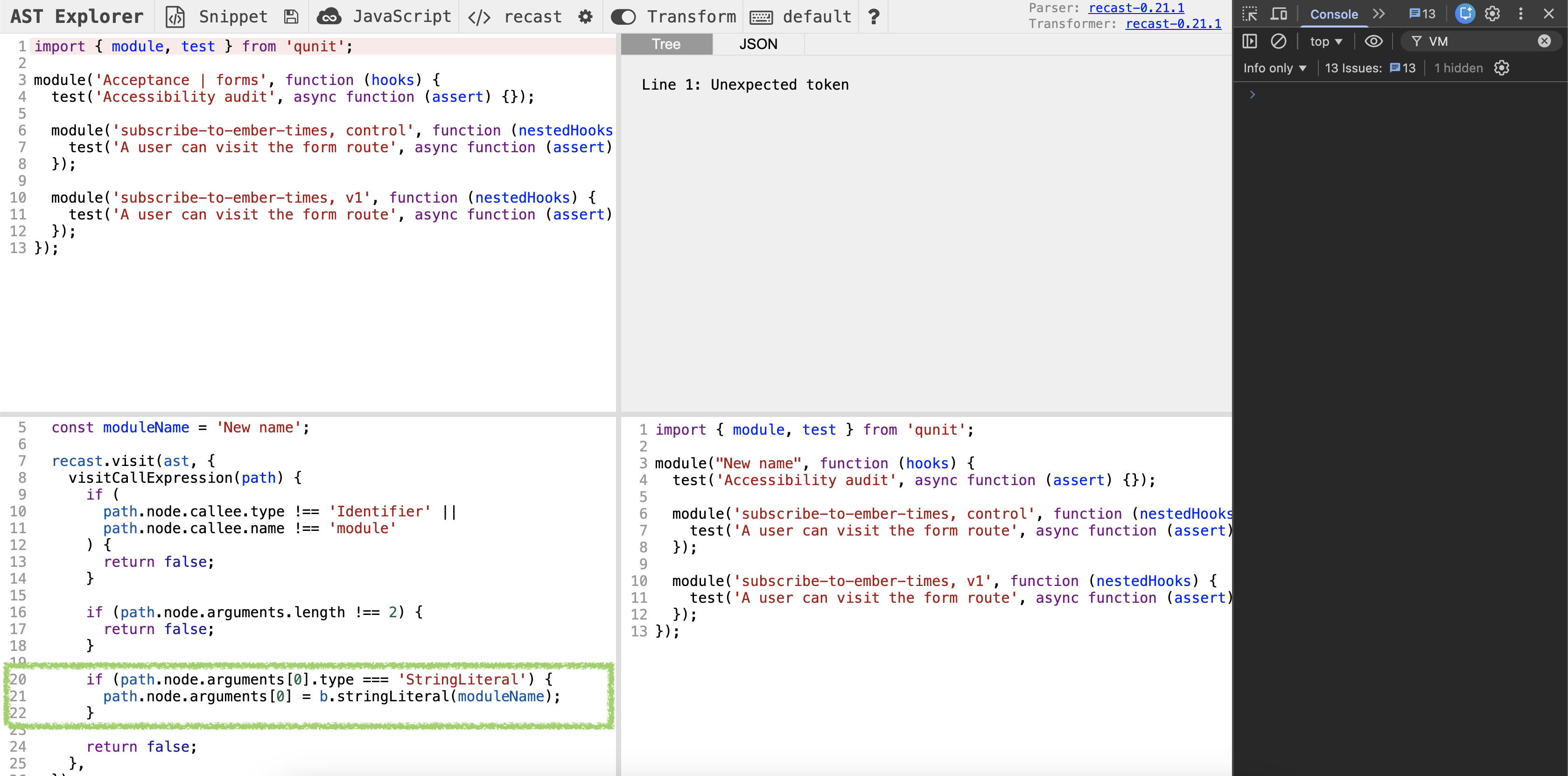
Again, try using the error message in the console to find out how to update the tree. (This is not easy!) If done correctly, the output file at the bottom-right corner will show a new name for the test module.
Solution
export default function transformer(code, { recast, parsers }) {
  const ast = recast.parse(code, { parser: parsers.typescript });
  const b = recast.types.builders;

+   const moduleName = 'New name';
+
  recast.visit(ast, {
    visitCallExpression(path) {
      if (
        path.node.callee.type !== 'Identifier' ||
        path.node.callee.name !== 'module'
      ) {
        return false;
      }

      if (path.node.arguments.length !== 2) {
        return false;
      }

      if (path.node.arguments[0].type === 'StringLiteral') {
-         console.log('-- CallExpression --');
-         console.log(path.node);
+         path.node.arguments[0] = b.stringLiteral(moduleName);
      }

      return false;
    },
  });

  return recast.print(ast).code;
}
Time to get real
Once you arrive at an implementation in AST Explorer, moving the code to the codemod is trivial. Copy-paste the object with the visit methods, then replace b. with AST.builders.. How should we pass data like moduleName?
Solution
To pass data, we use an object. Objects help us maintain and extend code, because they don't create an order dependency among items that don't have a natural order.
import { readFileSync, writeFileSync } from 'node:fs';
import { join } from 'node:path';

import { AST } from '@codemod-utils/ast-javascript';
import { findFiles } from '@codemod-utils/files';

import type { Options } from '../types/index.js';

+ type Data = {
+   moduleName: string;
+ };
+
- function renameModule(file: string): string {
+ function renameModule(file: string, data: Data): string {
  const ast = AST.traverse(file, {
-     // ...
+     visitCallExpression(path) {
+       if (
+         path.node.callee.type !== 'Identifier' ||
+         path.node.callee.name !== 'module'
+       ) {
+         return false;
+       }
+
+       if (path.node.arguments.length !== 2) {
+         return false;
+       }
+
+       if (path.node.arguments[0]!.type === 'StringLiteral') {
+         path.node.arguments[0] = AST.builders.stringLiteral(data.moduleName);
+       }
+
+       return false;
+     },
  });

  return AST.print(ast);
}

export function renameAcceptanceTests(options: Options): void {
  const { projectRoot } = options;

  const filePaths = findFiles('tests/acceptance/**/*-test.{js,ts}', {
    projectRoot,
  });

  filePaths.forEach((filePath) => {
    const oldPath = join(projectRoot, filePath);
    const oldFile = readFileSync(oldPath, 'utf8');

+     const data = {
+       moduleName: 'New module',
+     };
+
-     const newFile = renameModule(oldFile);
+     const newFile = renameModule(oldFile, data);

    writeFileSync(oldPath, newFile, 'utf8');
  });
}We expect the test script to fail, since all test modules in the tests/acceptance folder should be renamed to New module. Indeed, this is the case.
Expected output
The lines that start with + ("actual") help us understand what we might get, had we run the codemod on some project.
The lines that start with - ("expected") are what we should get, according to the current output fixture project. Keep in mind that, until we finish writing the codemod, the expected lines may be incorrect.
❯ pnpm test

failures:

---- index > sample-project message ----
AssertionError [ERR_ASSERTION]: Expected values to be strictly deep-equal:
+ actual - expected ... Lines skipped

{
  '.gitkeep': '',
...
        "import { module, test } from 'qunit';\n" +
        '\n' +
+         "module('New module', function (hooks) {\n" +
-         "module('Acceptance | forms', function (hooks) {\n" +
        '  setupApplicationTest(hooks);\n' +
        '\n' +
...
        "import { module, test } from 'qunit';\n" +
        '\n' +
+         "module('New module', function (hooks) {\n" +
-         "module('index', function (hooks) {\n" +
        '  setupApplicationTest(hooks);\n' +
        '\n' +
...
        "import { module, test } from 'qunit';\n" +
        '\n' +
+         "module('New module', function (hooks) {\n" +
-         "module('Acceptance | product-details', function (hooks) {\n" +
        '  setupApplicationTest(hooks);\n' +
        '  setupCustomAssertionsForProducts(hooks);\n' +
...
Currently, data.moduleName is hard-coded. Let's derive the test module name from the file path (create the inverse function of what Ember CLI does). We can use parseFilePath from @codemod-utils/files to parse a file path.
Solution
It's important to note that Windows uses \ as the file separator, while the entity name uses / (independently of the operating system). We can use relative and sep from Node to normalize values.
The implementation for renameModule remains unchanged and has been hidden for simplicity.
import { readFileSync, writeFileSync } from 'node:fs';
- import { join } from 'node:path';
+ import { join, relative, sep } from 'node:path';

import { AST } from '@codemod-utils/ast-javascript';
- import { findFiles } from '@codemod-utils/files';
+ import { findFiles, parseFilePath } from '@codemod-utils/files';

import type { Options } from '../types/index.js';

type Data = {
  moduleName: string;
};

+ function getModuleName(filePath: string): string {
+   let { dir, name } = parseFilePath(filePath);
+
+   dir = relative('tests/acceptance', dir);
+   name = name.replace(/-test$/, '');
+
+   const entityName = join(dir, name).replaceAll(sep, '/');
+
+   // a.k.a. friendlyTestDescription
+   return ['Acceptance', entityName].join(' | ');
+ }
+
function renameModule(file: string, data: Data): string {
  // ...
}

export function renameAcceptanceTests(options: Options): void {
  const { projectRoot } = options;

  const filePaths = findFiles('tests/acceptance/**/*-test.{js,ts}', {
    projectRoot,
  });

  filePaths.forEach((filePath) => {
    const oldPath = join(projectRoot, filePath);
    const oldFile = readFileSync(oldPath, 'utf8');

    const data = {
-       moduleName: 'New module',
+       moduleName: getModuleName(filePath),
    };

    const newFile = renameModule(oldFile, data);

    writeFileSync(oldPath, newFile, 'utf8');
  });
}Run the test script again to check the test module names.
Expected output
Success! 🥳 The "actual" lines are what Ember CLI writes when we generate an acceptance test.
❯ pnpm test

failures:

---- index > sample-project message ----
AssertionError [ERR_ASSERTION]: Expected values to be strictly deep-equal:
+ actual - expected ... Lines skipped

{
  '.gitkeep': '',
...
        "import { module, test } from 'qunit';\n" +
        '\n' +
+         "module('Acceptance | form', function (hooks) {\n" +
-         "module('Acceptance | forms', function (hooks) {\n" +
        '  setupApplicationTest(hooks);\n' +
        '\n' +
...
        "import { module, test } from 'qunit';\n" +
        '\n' +
+         "module('Acceptance | index', function (hooks) {\n" +
-         "module('index', function (hooks) {\n" +
        '  setupApplicationTest(hooks);\n' +
        '\n' +
...
        "import { module, test } from 'qunit';\n" +
        '\n' +
+         "module('Acceptance | products', function (hooks) {\n" +
-         "module('products page', function (hooks) {\n" +
        '  setupApplicationTest(hooks);\n' +
        '  setupCustomAssertionsForProducts(hooks);\n' +
...
Fix fixtures
As mentioned in Chapter 2, acceptance tests will likely fail when you create or update a step. Run update-test-fixtures.sh to update the output fixtures and get the acceptance tests to pass.
./update-test-fixtures.shThat was a big chapter with lots of new information. Before moving to the next one, consider taking the day off!