@codemod-utils/ast-template
Utilities for handling *.hbs files as abstract syntax tree
What is it?
@codemod-utils/ast-template provides methods from @glimmer/syntax to help you parse and transform *.hbs files.
import { AST } from '@codemod-utils/ast-template';

function transform(file: string): string {
  const ast = AST.traverse(file, {
    /* Use AST.builders to transform the tree */
  });

  return AST.print(ast);
}API
AST
An object that provides builders, print, and traverse.
In a traverse call, you can specify how to visit the nodes of interest ("visit methods") and how to modify them ("builders").
import { AST } from '@codemod-utils/ast-template';

type Data = {
  newName: string;
  oldName: string;
};

function transform(file: string, data: Data): string {
  const ast = AST.traverse(file, {
    ElementNode(node) {
      if (node.tag !== 'MyComponent') {
        return;
      }

      // Rename argument
      node.attributes = node.attributes.map((attribute) => {
        if (attribute.name !== `@${data.oldName}`) {
          return attribute;
        }

        return AST.builders.attr(`@${data.newName}`, attribute.value);
      });
    },
  });

  return AST.print(ast);
}How to test your code
Currently, @glimmer/syntax lacks documentation and tutorials. This is unfortunate, given the large amount of builders and visit methods that it provides to help you transform code.
I recommend using AST Explorer to test a small piece of code and familiarize with the API. The error messages from TypeScript, which you can find in your browser's console, can sometimes help.
If you intend to publish your codemod, I recommend using @codemod-utils/tests (create and test file fixtures) to check the output and prevent regressions.
AST Explorer
In the top navigation menu, select these options to create a 4-tab window:
- Language:
Handlebars - Parser:
ember-template-recast(orglimmer) - Transform:
ember-template-recast(orglimmer)
The upper-left tab allows you to provide one or more examples of code. In the bottom-left tab, write the code that will transform the examples. You will see the results in the bottom-right tab.
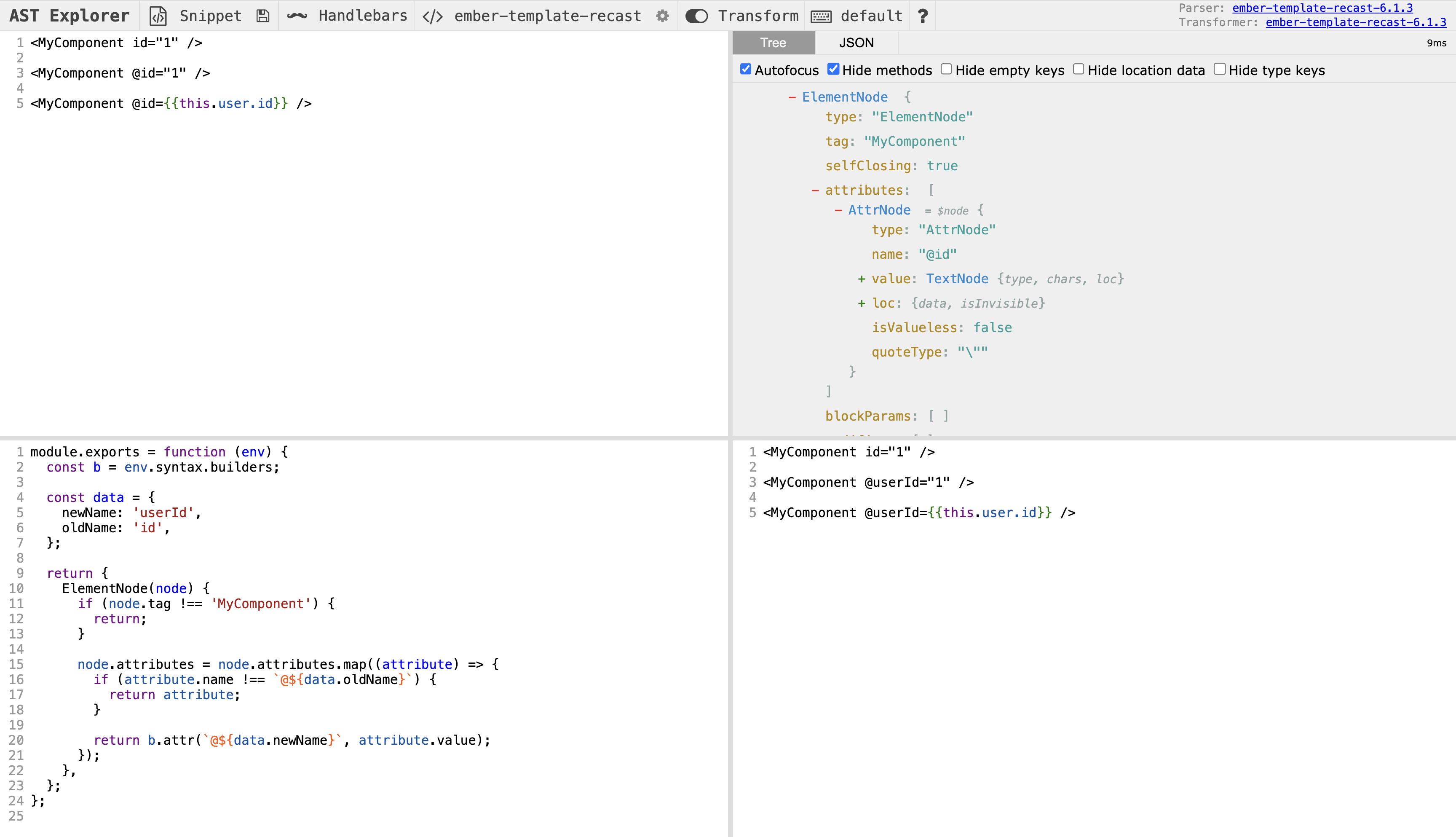
Once you are happy with the code, copy-paste the visit method(s) to your file, then rename b. to AST.builders..
module.exports = function (env) {
const b = env.syntax.builders;
const data = {
newName: 'userId',
oldName: 'id',
};
return {
ElementNode(node) {
if (node.tag !== 'MyComponent') {
return;
}
import { AST } from '@codemod-utils/ast-template';
type Data = {
newName: string;
oldName: string;
};
function transform(file: string, data: Data): string {
const ast = AST.traverse(file, {
ElementNode(node) {
if (node.tag !== 'MyComponent') {
return;
}
How to type your code
In theory, every visit method provides you the correct type with node.
If a type error occurs when accessing a property in node, you likely didn't make an early exit correctly. If the error occurs because @glimmer/syntax didn't provide enough information, then use @ts-expect-error to ignore the error for now.
If you need to refer to a specific type, you may use TypeScript's typeof operator and Parameters and ReturnType utilities to reach it.
import { AST } from '@codemod-utils/ast-template';

type Attribute = ReturnType<typeof AST.builders.attr>;Alternatively, you can type what you don't own as unknown, then use @ts-expect-error to ignore errors.